


Wichita State University
myPerformance atWICHITA STATE UNIVERSITY:
myPerformance Evaluation Timeline Summary
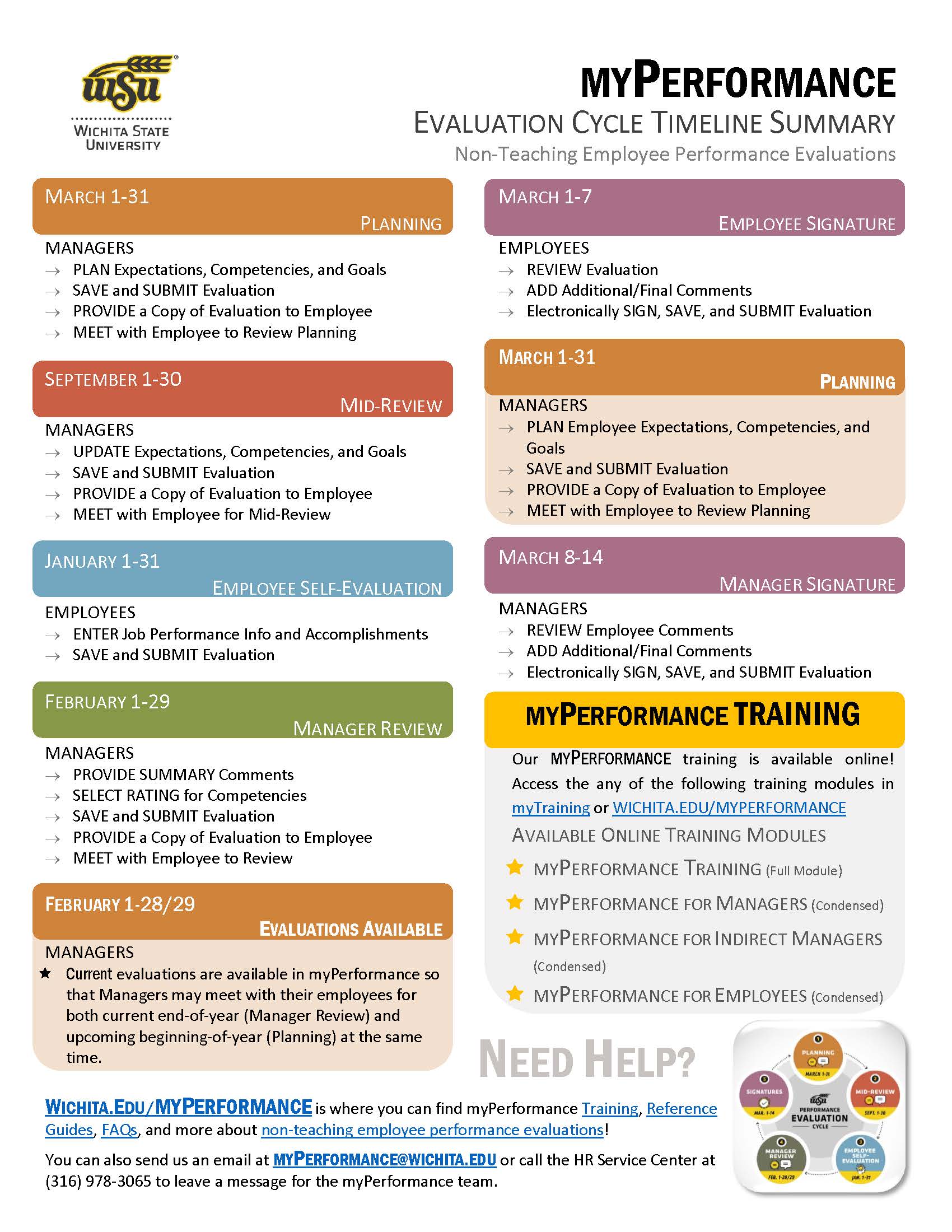
Information about the myPerformance evaluation timeline, online training, and help can be found on this flyer. Click on the button below to get your copy!
myPerformance Frequently Asked Questions
- Why can't I see/find my (or my employees) current evaluation(s)?
- What is myPerformance?
- What are the duties of a Direct Manager in myPerformance?
- What are the duties of an Employee in myPerformance?
- What are the duties of an Indirect Manager in myPerformance?
- What are all of the Steps in the Review Period?
- What is the Annual evaluation period timeline?
- What is the purpose of the Goals section?
- How do I know what to type into the Competency section?
- What if an employee is not performing to expectations?
- What if my position changes? Will myPerformance re-assign me a new evaluation?
- How do I change my profile picture in the myPerformance software?
- What training is available?
Why can't I see/find my (or my employees) current evaluation(s)?
There could be several reasons:
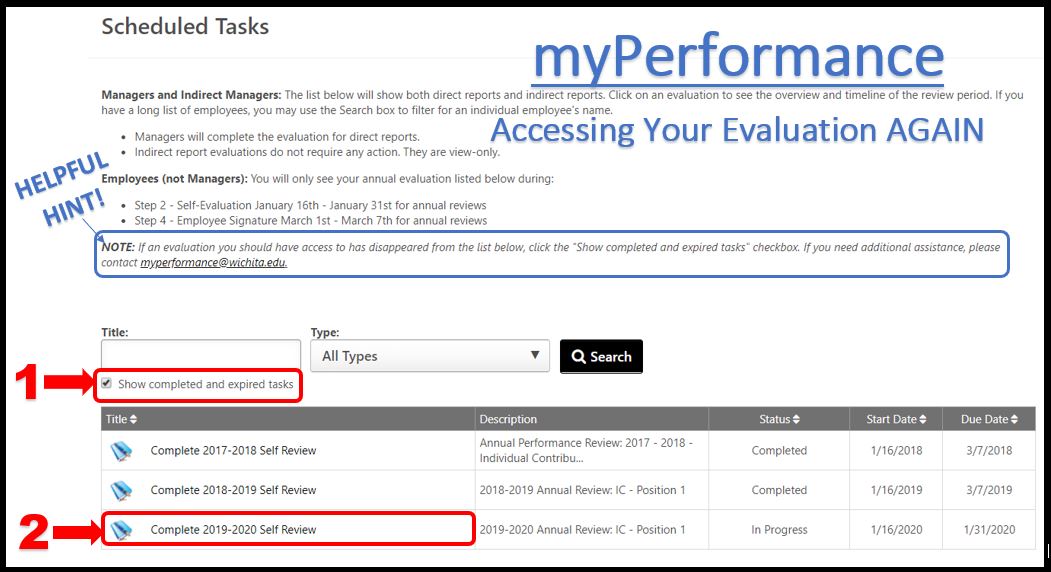
- The most common reason is that the "Show completed and expired tasks" box is not checked. Check this box (image below), then search and check again.
- Employees are not able to see their current evaluations during the Planning and Mid-Review Steps of the evaluation cycle (March 1 - December 31), Manager Review (February 1 - the last day of February), or Manager Signature (March 14th - March 31). During these times, only Managers and Indirect Managers have access to their employees evaluations. Your manager should provide you a copy of your current review during your initial Planning period (March 1 -March 31) and Mid-Review period (September 1 - September 30).
- Employees will only have access to their current evaluation during Employee Self-Review (January 1 - January 31) and Employee Signature (March 1 - March 7). Employees will have access to their past evaluations once the Manager Signature step (March 8 - March 14) has been completed.
- Managers are not able to see their employee's current evaluation during the Employee Self-Review step (January 1 - January 31) and Employee Signature step (March 1 - March 7).
What is myPerformance?
myPerformance is software designed to aid Wichita State University staff in managing performance of their employees. It is a tool that will facilitate conversations about performance between employees and managers. myPerformance helps each employee understand expectations of their role and how they are achieving their assigned competencies and goals. The design also feeds into our University’s Strategic Plan and is a foundation for employee growth and future career options. Currently, it houses evaluations for all USS and non-teaching UP employees.
What are the duties of a Direct Manager in myPerformance?
Direct Managers must log in to myPerformance during the Planning and Mid-Review Step of each review period to input or modify comments on competencies and goals for their employees. At the end of the evaluation cycle, a direct manager will also need to rate their employee(s) on University competencies, and submit an electronic signature. Direct Managers are expected to meet with their employees at regular intervals during the review period to convey competency and goal expectations, address receptivity, and express rating explanations.
What are the duties of an employee in myPerformance?
The minimum requirement of an employee is to electronically sign the evaluation at the end of the review period in order to acknowledge that the employee received the evaluation. (The signature does not imply the employee agrees or disagrees with the ratings.) myPeformance also allows employees the opportunity to provide a self-evaluation for the review period by providing comments to competencies and goals or any other achievements or issues before the manager completes their final rating.
What are the duties of Indirect Managers in myPerformance?
Indirect Managers do not have any required duties in myPerformance, however the software provides Indirect Managers with the opportunity to view any of their indirect reports’ evaluations at any time throughout the review period. This allows Indirect Managers to evaluate how timely their direct reports are completing their evaluations, which affects how they will rate their direct reports on the Leadership Competency. It also allows them the ability to see how well indirect reports are performing during any given time.
What are all of the Steps in the Review Period?
There are 5 steps in the review process:
- Planning and Mid-Review
- Employee Self-Evaluation
- Manager Review
- Employee Signature
- Manager Signature
What is the Annual evaluation period timeline?
The Annual evaluation period timeline is:
- Planning and Mid-Review: March 1 to December 31
- Employee Self-Evaluation: January 1 to January 31
- Manager Review: February 1 to February 28/29
- Employee Signature: due March 7
- Manager Signature: due March 14
What is the purpose of the Goals section?
This section is optional and will not be rated. Managers can input goals during planning or at various times throughout Step 1. Best practice is to allow performance on employee goals be tied to actual competencies.
How do I know what to type into the Competency section?
When completing this section, the manager should provide specific examples of work
expected that demonstrate how the competency would be rated. Job duties from the employee’s
position description should be tied to the competencies. These examples should be
added in the Comment box that appear under each competency.
Managers can make multiple entries in the Comments box during the time assigned to
Step 1. This will include comments documenting mid-evaluation progress and discussion
with the employee. Managers may include additional comments such as foreseen barriers,
changes, or amendments.
What if an employee is not performing to expectations?
If at any time, a manager feels their employee is not performing to expectations, the manager should contact their Human Resources Business Partner for guidance.
What if my position changes? Will myPerformance re-assign me a new evaluation?
Yes, myPerformance is designed to re-assign a new evaluation to anyone who has a new position number.
How do I change my profile picture in the myPerformance software?
To change your myPerformance profile picture:
- Login to myPerformance (within myWSU)
- Select the "gear" icon on the top/right side of the screen
- Select "My Account"
- Hover over the silhouette to find the hidden drop-down arrow
- Select "Change"
- Upload an image by clicking the "Choose File" button
- Select "Upload"
- Select "Save"
What training is available?
myPerformance training provides an overview of myPerformance for employees, managers, and indirect managers. The training focuses on the navigation of myPerformance to complete the evaluation process, including all steps in the evaluation cycle, the self-evaluation process, and the signature process. Managers and employees can register for training through myTraining in myWSU or go to our myPerformance Training page.
SME: SP/SRAP
Updated: 06/13/2023 NH