


Wichita State University
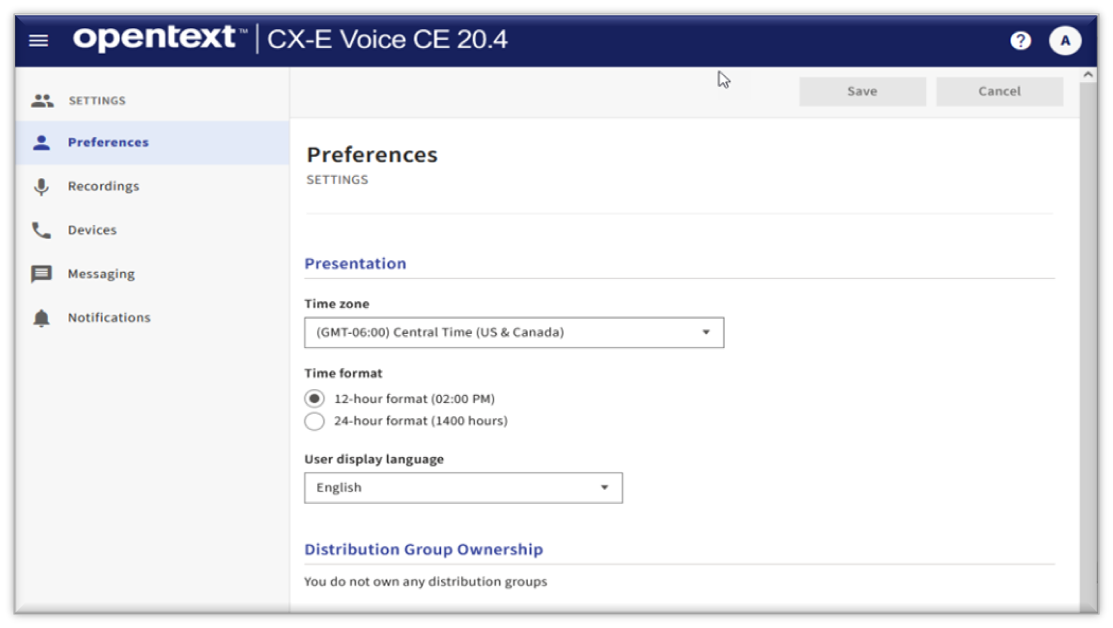
Opentext / CX-E Voice is the new Voicemail Management Application for accessing your voicemail online.
WSU Employees with an @wichita.edu email account that are associated with a WSU Phone extension are automatically set up with a Federated Voicemail Account. With Federated Voicemail accounts:
- Voicemails are stored in the Email environment, so they synchronize with @wichita.edu email accounts
- Accounts are automatically be set up with email notification:
- When the email is read, the notification light will go out on the phone
- When the email is deleted, the voicemail will be deleted from the voicemail Server
Please note: Employees with a Federated Voicemail account will not be able to access voicemail messages online. Only voicemail settings can be modified through the online platform.
For all other WSU voicemail extension, the Non-Federated version is available, such
as departmental voicemail extensions. See the  for details.
To set up your voicemail online:
- Go to https://wpm.wichita.edu/user/login/
- Log in
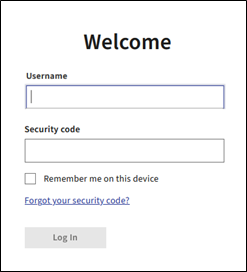
- Use the following login options:
- Username: Your phone extension number (4 digits)
- Security Code: Your voicemail security code or password. (For initial setup, enter the security code assigned to you.)
- Click Log In
- Use the following login options:
- You will be prompted to set up your account
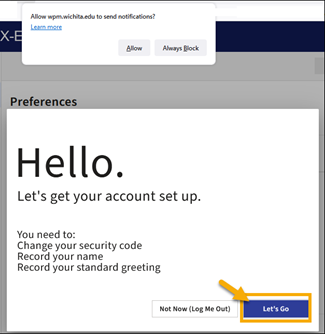
- Your browser will ask you if you want notifications from the Voicemail site. Select "Allow" or "Always Block" on the pop up, depending on your preference.
- Click "Let’s Go"
- During setup, you will be prompted to change your Security Code.
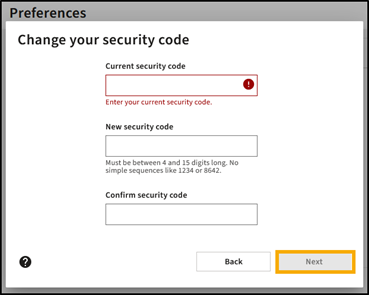
- Enter the current security code (assigned to you by Telecom)
- Enter a new security code (Must be between 4-15 digits long)
- Confirm the new security code by re-entering the new code
- Click Next
- Set Preferences for recording and playback: Select Preferences and Click Next
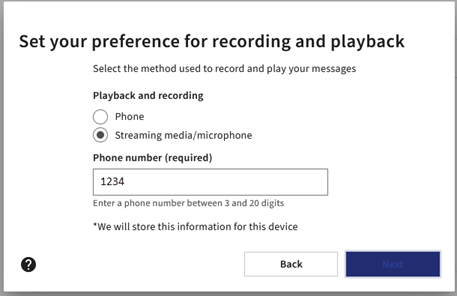
- You can change method used to record and play your messages by managing the settings on this screen. By default, the phone number field will be populated with the primary device assigned to you by your administrator.
- Phone: Allows you to record or play your messages using the phone indicated in the Phone number box.
- Streaming media / microphone: Allows you to record and play your messages through your laptop, tablet, or other Internet-connected device.
- Record you name
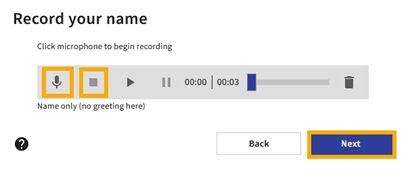
- Click the Microphone Icon
- Say your name
- Click square stop icon to stop recording
- Click the Play arrow to review the recording
- Repeat steps to re-record name
- Click Next
- Record the Standard Greeting your callers will hear
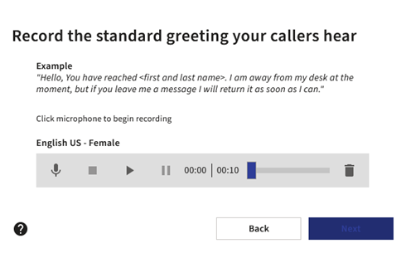
- Click the Microphone Icon
- Say your greeting
- Click square stop icon to stop recording
- Click the Play arrow to review the recording
- Repeat steps to re-record name
- Click Next
No further action is required to set up your voicemail. With a Federated Account, email notifications will automatically be sent with a voicemail message is left. Please see the next section for information regarding email notifications.
Email Notification of Voicemail Messages
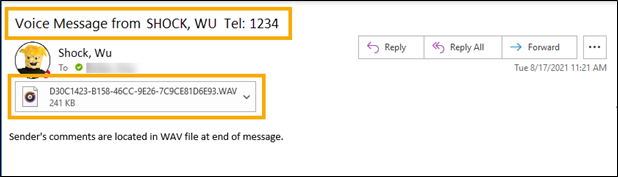
Email Notification is automatically set up and synchronized with your WSU email address (@wichita.edu). When a voicemail message is left on the extension, an email will automatically be sent to the employee’s email address.
- The Subject line lists name and extension of the caller
- Click on the attached Audio file to listen to the message
Please note:
- The message notification light on the phone extension will go out once the email is read
- VOICE MESSAGE ON THE PHONE IS DELETED WHEN THE EMAIL IS DELETED.
Optional: Settings
The following settings are optional and can be modified or adjusted per user preferences.
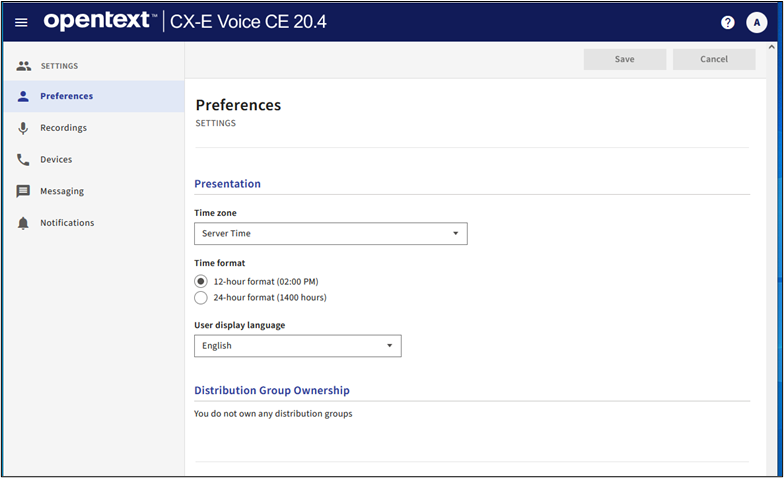
Preferences - Time zone & Display Language
Set up or modify time zone, format, and language options
- Select the default time zone
- Time Format can be set to either 12 or 24 hour format
- Select the User display language
- Save after selecting preferred preferences.
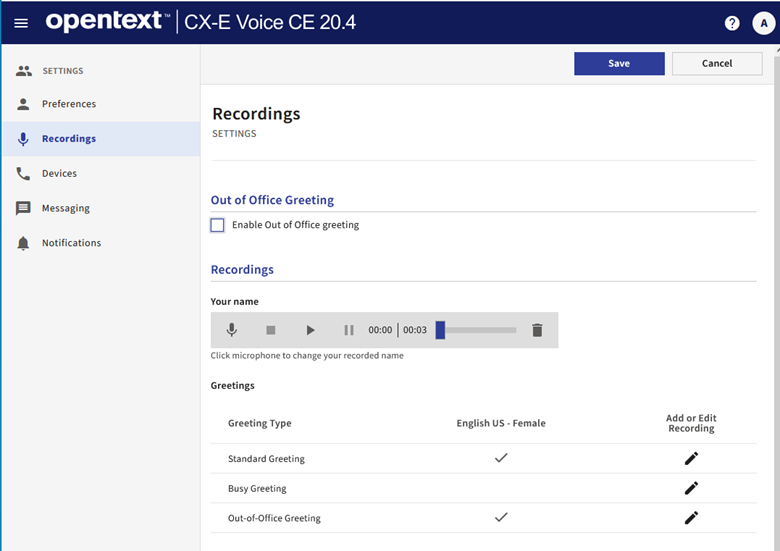
Recordings
Modify or enable Recorded Greetings for Standard, Busy, or Out of Office
- Enable Out of Office Greeting
- Check to enable once Out of Office greeting is recorded
- Recordings – Type of Greetings: Standard, Busy, or Out of Office
- Click Pencil to Record or Edit Greeting
- Click the Microphone Icon
- Record your message
- Click square stop icon to stop recording
- Repeat above steps to re-record greeting
- Click Save
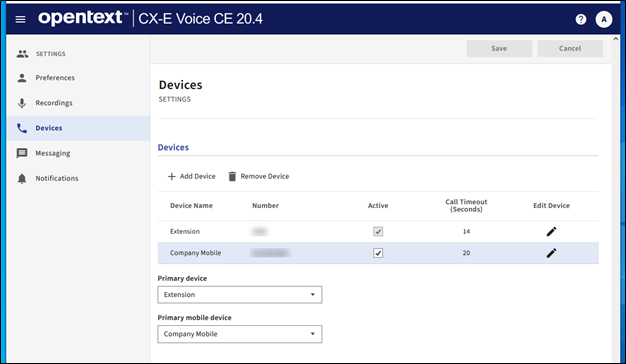
Devices
On the Devices page you can add or edit your devices and set the Primary device and the Primary mobile device if your administrator grants permission and provisions your account.
The default WSU Extension number cannot be changed or removed.
- Primary device - Default setting is Extension. There can be only one primary device for the mailbox. This is the device to which the system attempts to transfer calls. When callers use the automated attendant to transfer to a user, they system always attempts a transfer to the primary device, regardless of which number the caller dialed.
- Primary mobile device - This number designates the device as the user's primary mobile device. Only one device can be designated as a primary mobile device.
Note: You can select a single device as both the primary and primary mobile device.
Add a New Device
- Select Add Device
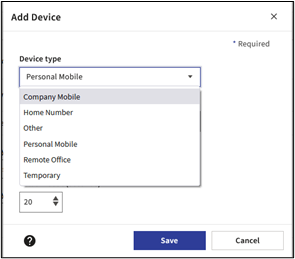
- Device Type: select from the available options
- Enter Device number and select Activate this number check box
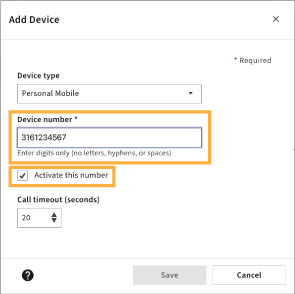
- Set the Call timeout (seconds) using the up or down arrows or enter a value with a minimum value of 5
and maximum value of 60.
- Call Timeout (seconds) - The Call Timeout default values vary by device type. Use the up/down arrows to change the Call Timeout from the current default setting. The call timeout parameter instructs the system how long to ring (in seconds) the selected device before considering it a RNA (ring no answer) condition. The timer starts when ringback is detected.
- Select Save
Messaging
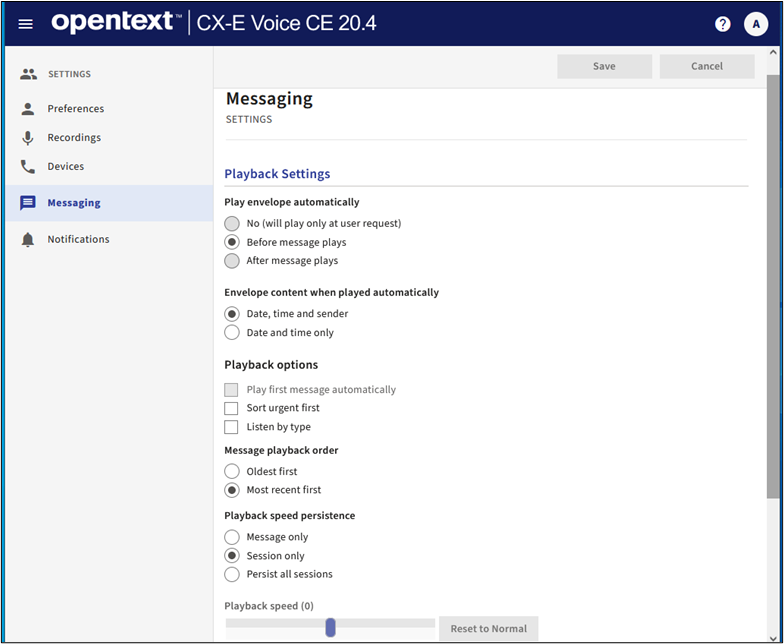
On the Messaging page you can configure and manage how the system plays the message envelope information and sorts your messages.
- The message envelope contains the sender’s information. Depending on your settings, it can include the sender’s name, date and time of the message.
- Playback options provide you with choices to sort by urgency, type or recency. You can also set your message playback speed by message or session.
After you choose your setting options, select Save to save your choices. To leave the page without saving and clear your choices, select Cancel.
Notifications
Outcall Notification
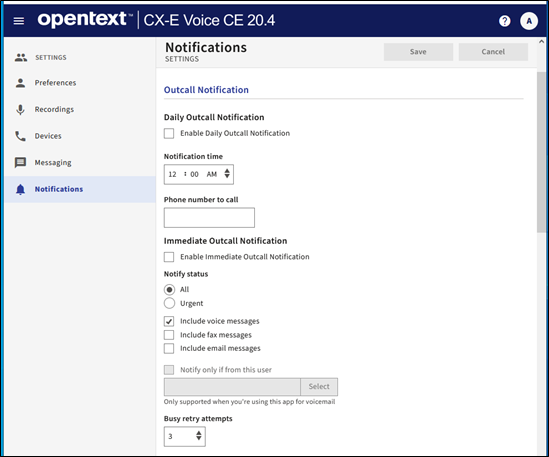
The Outcall Notification feature allows you to configure whether, and when, the system notifies you that new messages have arrived. You can also define your message notification delivery options. The Outcall Notification feature can contact regular phone numbers, digital pagers, PIN-based pagers, and radio pagers.
When your mailbox receives a message, the system determines whether to notify you based on the message type, message sender, and time of day you specify. If the message meets your requirements, then the Outcall Notification feature tries to notify you of the message by calling the first telephone number on your personal call list.
Contact Information
Telecommunications: (316) 978-3535 or telecomservices@wichita.edu