A group of students walk together on campus to their next class

Financial Aid and Scholarships

Jardine Hall, Room 203 • 316-978-3430 • wichita.edu/financialaid

When it comes to paying for your Wichita State education, you have options—and the Office of Financial Aid is here to help. In fact, WSU awards over $100 million in grants, loans, work-study funds and scholarships each year.

How to receive your financial aid

Apply for aid

Complete the Free Application for Federal Student Aid (FAFSA) at fafsa.gov and add WSU’s school code: 001950. Submit all additional requirements as soon as possible.

Accept and finalize your financial aid

  1. Access your myWSU account: Log into wichita.edu/mywsu using your myWSU ID number and password, then select the “myFinances” tab.
  2. Read the terms and conditions: Select the “Financial Aid Awards” link and then select the 2024-25 award year. Select the “Terms and Conditions” tab. Review all WSU aid policies at wichita.edu/finaidpolicy.
  3. Accept award offer: Select the “Accept Award Offer” tab to view your awards. Use the drop-down menu under “Accept Award” to select your decision for each award. Awards are split equally between fall and spring terms. You may accept a partial amount by entering it next to each award. Choose “Submit Decision.”
  4. Finalize your loans: If accepting loans, complete your Master Promissory Note (MPN), Loan Entrance Counseling, and Annual Student Loan Acknowledgement at studentaid.gov.

Back to top

Tuition payment

Here is some basic information you need to know to get (and keep) your financial aid awards throughout your WSU career.

How financial aid pays toward your bill

  • All accepted and finalized financial aid will be applied to your bill as early as 10 days before the start of your classes.
  • If you have financial aid in excess of your charges, you will receive a financial aid refund. Financial aid refunds can be received either through direct deposit or a mailed paper check.

Meet satisfactory academic progress (SAP)

Did you know that your academic performance directly impacts your financial aid eligibility? To remain eligible for your federal financial aid, you must meet these requirements each semester:

  • Successfully complete at least 67% of all attempted credit hours.
  • Maintain a minimum 2.0 cumulative GPA.
  • Complete your degree within 150% of all credit hours required to obtain your degree

Repeated courses and financial aid eligibility

  • There are limits to how many times you can retake a course and receive financial aid.
  • Once you earn a D- or higher in a course, you may repeat the course once and still receive financial aid.
  • Courses must count toward your degree to be eligible for financial aid. It’s important to be aware of the limits to your financial aid.

Scholarship renewal

To renew your Freshmen or Transfer Merit Scholarships, you must:

  • Freshmen merit recipients: Successfully earn 30 credit hours each year; 24 credit hours for transfer students.
  • Achieve a minimum 3.25 cumulative GPA.
  • Be a degree-bound undergraduate student working toward your first degree.
  • Refer to your award notification for scholarships awarded through the WSU Foundation, academic colleges or departments.

Pell grant lifetime eligibility

Limited to 600% over your lifetime as a student (the equivalent of six years at full-time enrollment).

Direct loan eligibility

Each loan type (subsidized, unsubsidized) has its own annual and aggregate limit.

Annual Direct Loan Limits

Grade Year Dependent Independent
Freshman $5,500 $9,500
Sophomore $6,500 $10,500
Junior / Senior $7,500 $12,500

Aggregate Direct Loan Limits

Loan Type Dependent Independent
Subsidized* $23,000 $23,000
Total loans $31,000 $57,500

*Subsidized loans are also limited to three years for an associate’s degree and six years for a bachelor’s

Back to top

Getting Started with Student Account Suite

Where to access

Use your myWSU ID and password to log into wichita.edu/mywsu. Select the myFinances tab. Select Student Account Suite to view your bill, make payments and manage your student account activity.

Before getting started

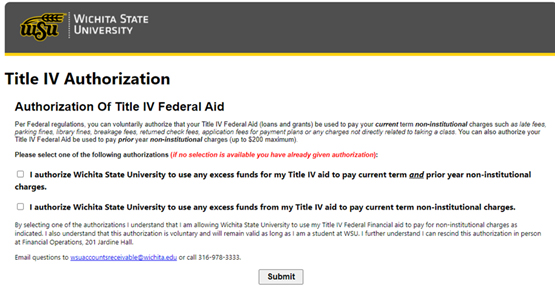
Title IV

  1. Select Let Financial Aid cover non-institutional charges.
  2. Complete the Title IV Authorization Release form.
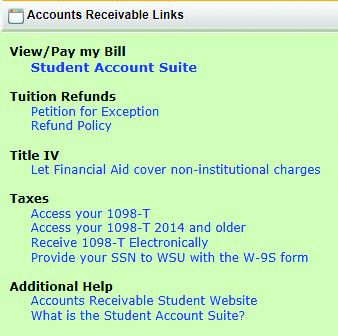
Accounts Receivable links in myWSU
Title IV Federal Aid authorization screen

Navigating the Student Account Suite

Start with the 1098-T. 

Why do this?

Doing this first allows you to get the 1098-T faster and print at your convenience.
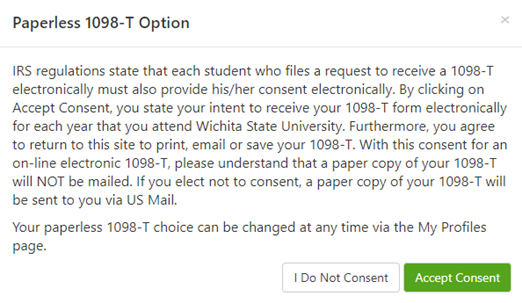
Paperless 1098-T option screen

Home Page 

Announcements

Look here to find current messages that may affect your WSU account.

Student Account

My Profile Setup

Select to edit.
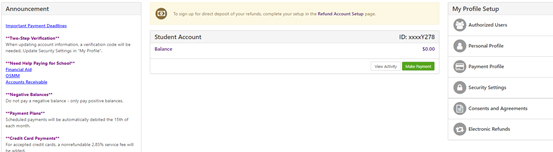
Student Account Suite home page screen

View Activity

To view your account in detail, click View Activity. Expand for more account detail.
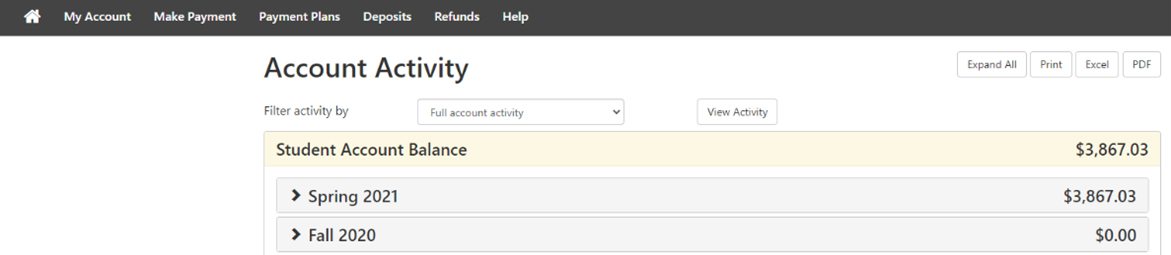
Current Activity screen

Back to top

How to add an authorized user

Why do this?

Give parents or guardians authorization to pay your bill. Users do not have access to grades.

1. From the Home Page tab, select Authorized Users.

2. Enter the email address of the Authorized User and answer Yes or No to the viewing questions. Click Continue.

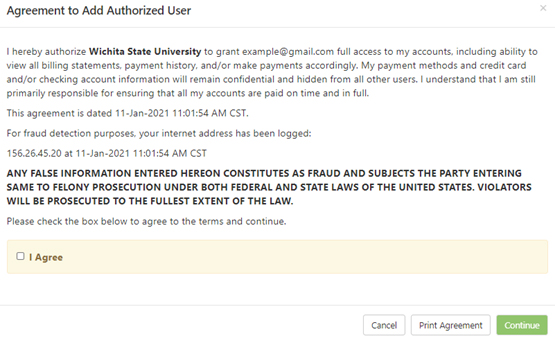
3. After reading the Agreement, check the I Agree box and click Continue.
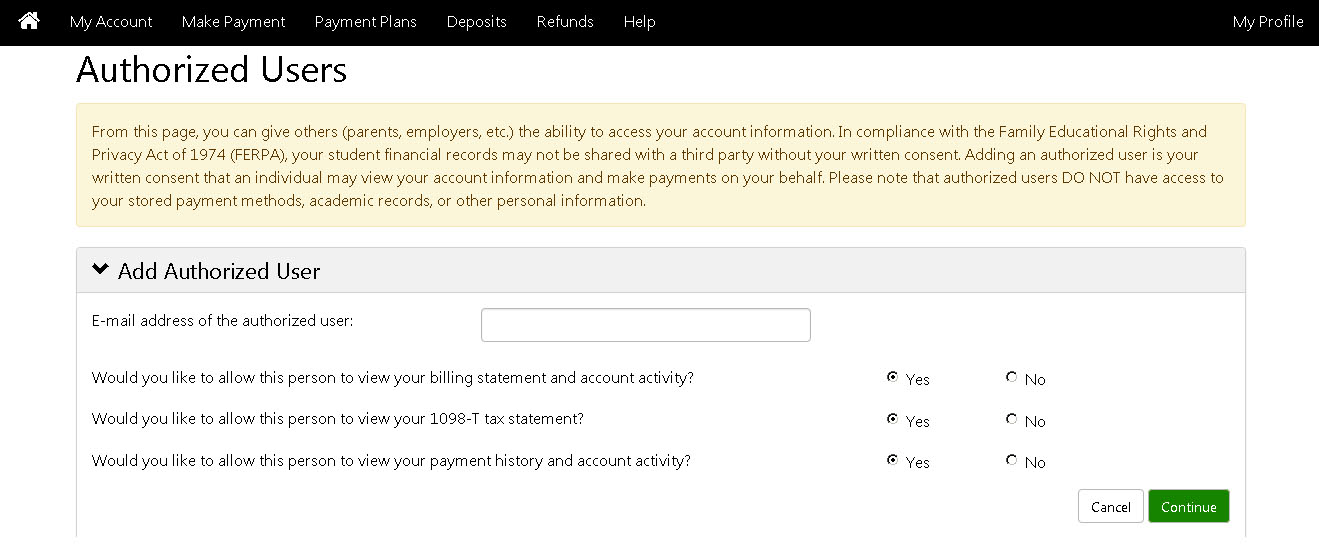
Authorized Users screen

Agreement to add Authorized User screen

4. The Authorized User will receive two emails with log-in and password information.
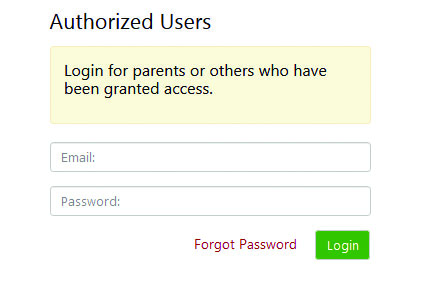
Authorized User log-in screen

Back to top

Make Payment tab

Choose Appropriate option. Amount and Payment Date can be changed.
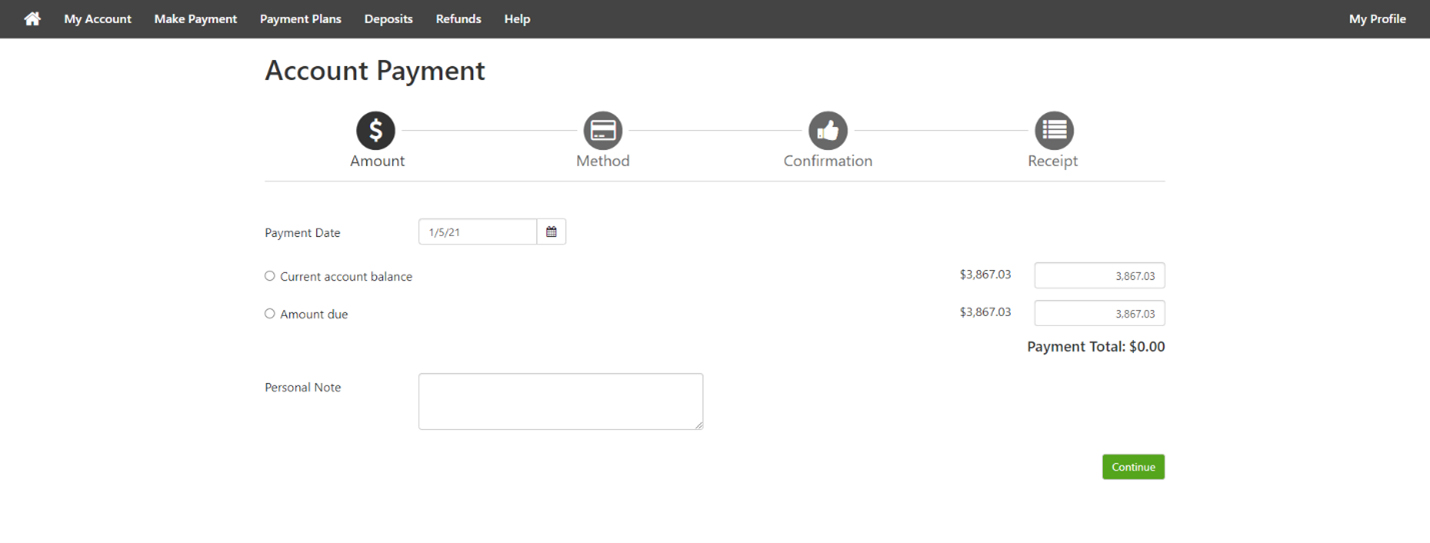
Student Account Suite payment screen

Payment Plans tab

Set up a Payment Plan to make periodic payments on your account. A non-refundable down payment of $100 and a non-refundable set-up fee of $30 are due when setting up your payment plan. The remaining balance is to be paid in equal payments over the remainder of the semester.

Fall – Sept. 15, Oct. 15, Nov. 15
Spring – Feb. 15, March 15, April 15

Summer – June 15, July 15
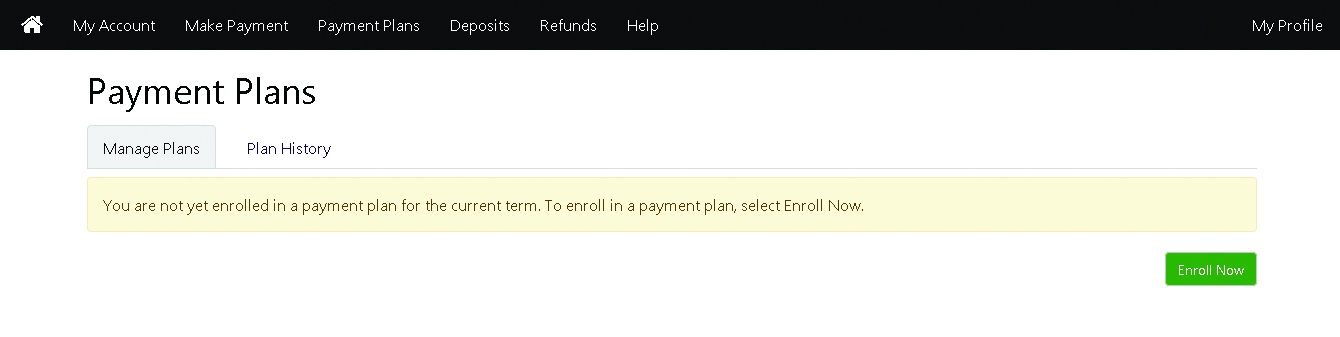
Payment Plans screen

IMPORTANT

In the setup of the Payment Plan, if you do not wish the payments to automatically pay from your checking/savings account, please be sure to select NO where asked if you want to schedule automatic payments.

Housing payments

Meal and room charges are automatically set up for students and can be paid in full or spread out over the semester.

Outstanding debts, fines, housing charges, health insurance and orientation fee cannot be part of the payment plan. 

Back to top

How to view statements

Select the date of the statement you would like to view. Click Action Button.

Selecting Pay will take you to the Payments tab.

Select View next to the year of the 1098-T Tax Statement you would like to view.
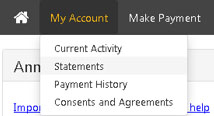
My Account tab view, with Statements option shown

Statements screen

Refunds tab

Why do this?

Get your refund quicker.

Go here to set up your eRefunds account.

Refund direct deposit

WSU issues refunds using the direct deposit information entered on Refunds. Information about refunds that were previously issued to you is located under Refund History.
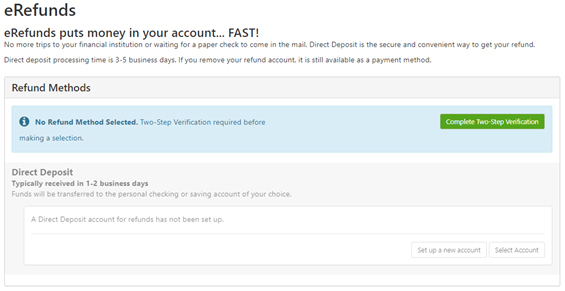
Refunds screen

Payment tips

Electronic checks

Electronic payments require a bank routing number and account number. Payments can be made from a personal checking or savings account with no transaction fees. No corporate or international checks are allowed.

Credit card payments

PayPath Payment Service is used to accept credit card payments. A non-refundable PayPath service fee of 2.85% ($3 minimum) will be added to your payment. Visa, MasterCard, Discover and American Express are accepted.

Credit card

A credit card verification value, an extra three- or four-digit number printed on the credit card is required. The number Verification Value is located on the back of the Visa, MasterCard and Discover cards and on the front of the American Express cards.

Payment email

After making an online payment, an automatic email notification(s) is sent to the NOTIFICATION address entered on the My Profiles tab.

Back to top

myFinances schedule

For specific dates, visit wichita.edu/ardates.

December or July

  • Set up authorized user – Student Account Suite
  • Set up direct deposit – Student Account Suite
  • Title IV signup

Mid-December or July

  • Check Student Account Suite for tuition and fees eStatements (no paper statements mailed)

January or August

  • Pay online using ACH, credit card or set up tuition payment plan in Student Account Suite
  • Financial aid disbursement for direct deposit
  • Financial aid checks mailed

After classes begin

  • Check WSU email for late fee reminder
  • Last day to pay tuition and housing without late fee
  • Last day to drop courses with a 100% refund
  • Last day to enroll in a tuition payment plan to avoid $100 late fee
  • $100 late fee applied to any student account with a balance of $150 or more
  • 1st housing payment plan due

February or September

  • Last day to set up tuition payment plan
  • 1st tuition and 2nd housing payment plans due

March or October

  • 2nd tuition and 3rd housing payment plan due

April or November

  • Check WSU email for late fee reminder
  • Final tuition and housing payment plans due
  • $100 late fee applied to any student account with a balance of $150 or more
 

Accounts Receivable

Office Location: Jardine Hall, Room 201
Phone: 316-978-3333
Website: wichita.edu/acctsrec
Address:

1845 Fairmount
Wichita, KS 67260-0038
Email: wsuaccountsreceivable@wichita.edu

Financial checklist

  • Open a local checking account
  • Activate online and mobile banking
  • Find branch and ATM locations
  • Set savings goals
  • Consider automatic monthly deposits to a savings account
  • Check out credit score information at whatsmyscore.org
  • Get a free credit report at annualcreditreport.com
  • Research a credit card to help build good credit
  • Set up a budget / spending plan
  • Review your account transactions each month

Back to top

Student Money Management

Office for Student Money Management (OSMM)

Neff Hall, Room 115 • wichita.edu/osmm

Get the financial guidance you need—FREE OF CHARGE—for college and beyond from WSU’s Office for Student Money Management within Student Success. Our certified peer financial coaches can help you:

  • Create a financial survival plan for college.
  • Learn about establishing good credit.
  • Understand identity theft and how to avoid it.
  • Graduate with a student loan repayment plan.
  • Create a monthly spending plan.

Back to top

©