


Wichita State University
Pinnacle Customer Login Instructions
Accessing Pinnacle:
- Log into Pinnacle
- Enter your MyWSU ID and Password
If you are not able to access the billing, please enter a service request at www.wichita.edu/services/telecom. Choose Telecommunications Assistance, then click Other and Billing.
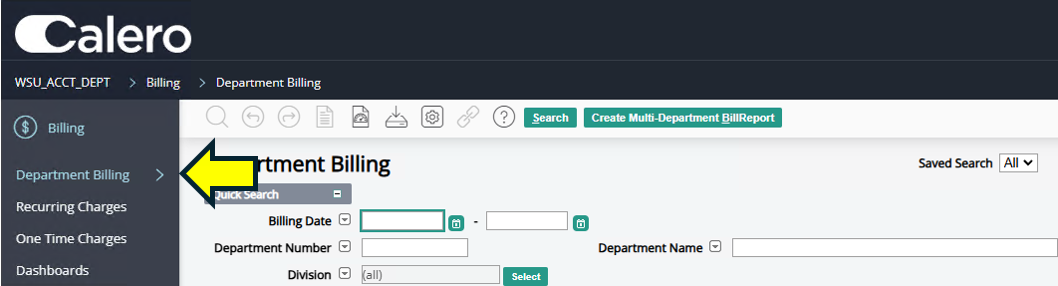
Choosing "Department Billing" on the "Billing" tab.
To Access The Monthly Bill:
- Under the "billing" tab choose "department billing".
- The search function should already be enabled and your monthly billings should be
listed there.
- If you would like to filter by a certain org or department, you may enter the number in the "Department Number" field.
- If you would like to filter by a certain billing date, you may choose that in the
"Billing Date" fields
ITS Telecommunications bills on the 25th of every month except June and December.
- Click on the date you want to see.
- For example, clicking "25-OCT-2020" will show the overall bill for that month.
- It breaks down the units and the total amount for recurring charges and one time charges.
- To view the bill in its entirety, click on "View Report".
- There are several subtabs under Department Billing that will help you to understand
your bill more fully.
- You can see a "Summary by Account" that will show you the funding used on all charges.
- "Non-Usage Charges" will show you all one time charges, such as work orders, cellular phone charges and conference calls. They each have a bill note to help you understand the charges.
- The "usage charges" subtab will show you all long distance calls made throughout the period.
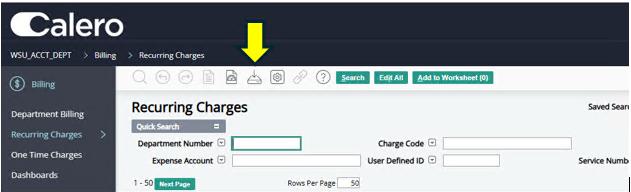
Example of downloading a "Recuring Charges" report.
To Download Any Report:
- You can download any report individually by drilling into the main tabs (recurring
charges, onetime charges, usage charges, etc.)
Each tab will have a down arrow, and that will start the downloading process. - To view the entire report, make sure you are on the department billing tab, and "summary" subtab.
- You will see a blue button that says "view report". Click "view report".
- It will take a moment for your bill to generate. You can save or print, whichever you prefer.
Go to top