


Wichita State University
What to Expect when Learning Online
Wichita State is committed to ensuring that all students have a meaningful and productive experience, no matter where their classroom is. As a remote student you will have access to Wichita State classes at a place that is convenient for you, and you can expect the same level of educational quality and institutional commitment as you would if you were on the physical campus.
Before you begin these new educational challenges, please take a moment to prepare yourself with the information you will need to be successful. The following pages will help you as they walk you through the following topics: necessary technologies, working in Blackboard, using necessary computer applications, and becoming a successful remote student.
Ready to get things underway? Select a topic below.

Learning Online
Check Your Tech
Check Your Tech
The first step for remote students is to make sure you can access your online courses. To do this, you're going to need access to a computer and the internet. In most cases you will also need access to a webcam and microphone.
What sort of computer will I need?
You can use a computer running Windows, Apple's OSX, or a Chromebook to access Blackboard and do your required work for most classes. Some classes may have specialized software and special requirements, but in most cases if you are not already aware of those requirements they will not be added now.
Your computer's operating system will need to be up to date, so make sure that you
run any updates that are available to you:
Updating a Mac
Updating a Windows computer
Can I use My Mobile Device?
Many students will want to use a mobile device like a smartphone, iPad, or other tablet to access their classes. The good news is, a lot of the work that you will need to do can be done using a mobile device, depending upon the device and the class you are taking.
- Mobile Devices and Blackboard - Blackboard performs well with mobile devices, and you should be able to do anything
in blackboard that you need to do.
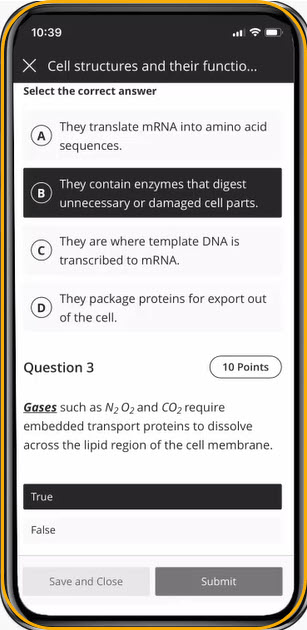
- Mobile Devices and Publisher tools - Most publisher tools work well with mobile devices, so in general this should be possible.
- Mobile Devices and Remote Proctored Exams - Some exams, in some classes, are typically proctored. When we move into an online environment, we have remote proctoring solutions that will monitor you and the room you are in while you are taking your exam. If you are in a class that is using a proctored exam of some sort, you may not be able to rely solely on your mobile device. The proctoring solution will require that a camera be on while you're taking the exam, and most mobile devices can't do things at once like that. For those exams, you may need to find a computer with a webcam. If that is a problem, talk to your instructors so they can work with you.
What if I don't have a computer?
For students who don't have access to a computer in any other way, there are a limited number of Chromebooks available. Information on requesting a Chromebook can be found at the link below under "Request for Chromebook."
What will I need to get on the internet?
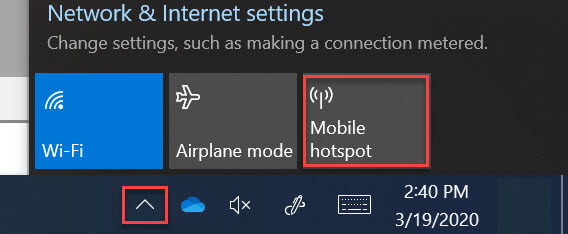
To be able to take your class remotely, you will need to be able to access the internet. If your home does not have internet service, you have a few options.
- "Tether" to your iPhone/Android Phone - Depending upon your service, you may be able
to use your phone as a "hotspot" or internet access point.
What Software will I need?
There are a handful of critical tools that you'll need to have to succeed as an online student. Luckily, most are available for free, or there are free alternatives available. Please read through this list of necessary software, and also check out the software listed on the Student Resources page provided by Information Technology Services (ITS).
Browser
A "browser" is the tool that you use to view web pages on the internet (or the web). Since Blackboard is a web-based tool, you will access it by using a browser. Most computers and devices come with a built in browser:
 Windows: Windows Edge
 Mac: Safari
 Chromebook: Google Chrome
There are other, free browsers available on all platforms. We recommend these two browsers for use with Blackboard:
 Firefox
- Google Chrome (already on Chromebooks)
You will need to be able to receive email to get reminders and announcements about your class. The Shocker mail system is browser-based, so there is no need to have any other software, but you do need to set it up. Here are instructions on setting up your Wichita State email.
Microsoft Office
All students have access to Microsoft Office (Microsoft Word/Excel/Powerpoint and
other tools) through the university. To access Microsoft Word, go to MyWSU, log in,
and look for the "Office 365" button on the top right-hand side of the page.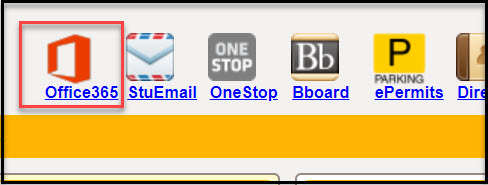
Find Training
Additional Training
Most remote learning takes place on the Blackboard platform.
The Student Training page includes sections on each of these. Click on the link for tutorials, videos, and additional information.
Be Successful
Be Successful
Go to the Library
Did you know you don't have to leave your house to go to the library? For off-campus access to many Library databases and other resources, once you locate the desired resource through online search, you will be directed to Wichita State's proxy server. This means you will be asked to login using your myWSU ID and your password. When the system has verified that you are a Wichita State student, you will see a verification screen and you will need to click a button to continue on to your digital destination. Some databases are not available off-campus due to licensing restrictions.
In addition to these resources, University Libraries have many online services to help keep you successful:
- Email general questions to the library at librarystaff@wichita.edu
- Get digital materials through interlibrary loan
Keep Communicating
It is very important for you to keep up communication with your instructors, your advisor, and other University staff who can help you in your remote studies. Here are some tips for communication:
- Make sure your emails are clear and professional.
- Subject Line: The subject line should summarize the content of the email in as few words as possible.
- Appropriate Greeting: Can be Dear, Hello, or (sometimes) Howdy; and are always followed by the person's name and title (Mr./Ms./Dr.). Inappropriate greetings: Hey, Yo.
- Introductory Statement: An introductory statement introduces yourself. It is not needed if you already know the person well, but is needed if they don't know you.
- Purpose: Explain why you're emailing at the beginning of the email so the receipient does not have to look for it. Include any important and relevant information.
- Closing: It is wise to close your email with a respectful statement thanking the person for taking the time to read or respond to your email/request.
- Salutations: Salutations such as "Very Respectfully" and "Sincerely" are always acceptable, however more causual salutations amay be used with people you know on a more personal level.
- Ask your professors all the questions you have. If you are wondering about updated course policies, new deadlines, etc. about your class, then other students want to know too. Make sure you are reaching out to your instructors through their desired mode of communication so you can get these questions answered. Your instructors want you to be successful, so make sure they are aware of all your questions. As a remote student, your instructor may want you to contact through email, an "Ask the Professor" discussion board in Blackboard, or through in-person contact during Zoom sessions.
- Need a question answered but you are not sure where to go? It's time to turn to the OneStop. The OneStop will be able to guide you to the right office.
Practice Good Study Habits
The Office of Student Success has excellent study habit resources. Here are some of their suggestions:
- Don't try to multitask! If you are studying in a nontraditional space, perhaps at home with many other people sharing the space, it's important to remember that trying to multitask will undermine your effectiveness.
- Remember to sleep. Sleeping may not feel like a priority right now, but it is. Not only will sufficient sleep help you retain what you learn, it may also help keep you physically healthy. Don't skimp on the zzzz's.
- Turn off the outside world, even if you are on your computer. Online and remote learning may require you to use a computer more than ever before. Before you go to your remote class and before you begin to study, shut your email and messaging programs off and put your phone in another room.
Find Help
Need help?
Get Academic Help
If you need academic support and help, you can find it through these resources:
- Success Coach appointments via Zoom (find your Success Coach here and call or email to schedule an appointment, or request an appointment from myWSU)
- Supplemental Instruction is being offered. Check Blackboard if your current course has an SI.
- If you have been using the services of a tutoring service, you may now find them online. To locate the online version of your tutoring center, check Blackboard. There are links to all tutoring centers under the tabs "My Institution," "My Courses," and "My Organizations." The following Centers are offering online tutoring through Blackboard and/or Zoom:
- If none of these options addresses your tutoring need, you can request a tutor though myWSU.
Reach out to Counseling and Prevention
Have recent events and the pace of change led to you feeling anxious? Wichita State Counseling and Prevention has a brief and anonymous mental health screening you can take online.
Be Kind Online
