


Wichita State University
Student Statistics Report Guide
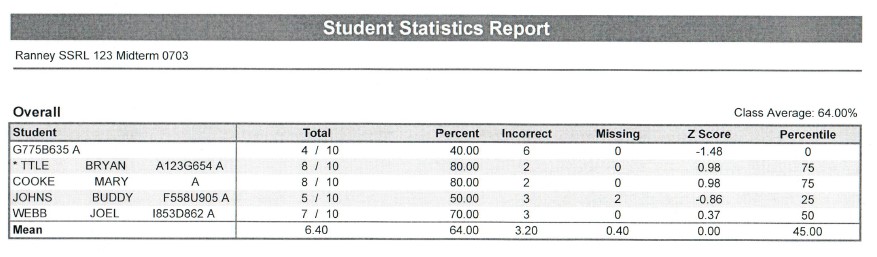
This report provides a quick view that shows how students performed on the exam.
It replaces the previous Detail List by Name and by Number reports.
This report can be provided in pdf format as well as csv format.
The Filter lists the information provided on the Exam Grading Request.
The Student column lists the student’s last name, first name, WSUID and form.
- The information will be blank if the student did not fill out the bubbles on the form.
- An asterisk means that the student filled in two bubbles in the same column.
The Total column shows the total points the student received; the second number is the total number of possible points on the exam.
- The exam questions are worth one point unless a PPRM (weighted) bubble form is provided.
The Percent column displays the percent score for each student along with a graph.
- Printouts from the SSRL will not show the color text.
The Incorrect column displays the number of incorrect responses including multiple response answers. It does not include blank responses.
- Note: The csv file includes specific columns for incorrect responses, blank responses, and multiple responses.
The Missing column displays the number of missing questions for each student. If there is a missing value it is because the question was left blank on the bubble form.
- Note: The csv file does not include the Missing column. The information is specifically parceled out into incorrect, blank, and multiple response columns.
The Z Score column indicates how many standard deviations a score is above or below the mean (symbolized by + or -).
The Percentile column gives the percentage of scores that are lower than that student’s listed score.
The report also displays the overall class average on the exam along with the mean for each of the columns. The csv file dooes not include this information.
CSV

Return to "Graded Exam Reports: Report Options."